Issue Deleting When Show Markdown Formatting is Off
If “Show Markdown Formatting” is off, the Markdown code is partially erased when I press Delete.
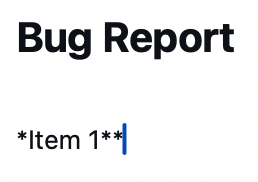
For example, if I had some bolded text like Item 1, then placed the cursor at the start of the line and pressed the Delete key, I ended up with “*Item**”.
Log in to comment and vote
Comments3
Gary Bacon (pixelbud)
Nov 16
Thanks for the clear report, the example made this quick to find. With the syntax hidden, Delete was removing one of the hidden asterisks instead of the letter next to the cursor. That is fixed and will be in the next update: Delete and Backspace now skip hidden formatting and delete the character as intended.
Tim Stringer
Nov 17
You’re very welcome, @Gary Bacon (pixelbud) . Thanks for your comments and it’s great to hear a fix will be in the next update!
Gary Bacon (pixelbud)
Nov 20
The fix is in 1.4.2, out now on Mac, iPhone and iPad. Delete and Backspace now step over hidden formatting and take the character you see next to the cursor.